

Air Container supports both Autoscaling and Scheduled Scaling, allowing you to automatically adjust the number of Replicas based on traffic patterns or predefined schedules.

Autoscaling

Autoscaling automatically increases or decreases the number of Replicas based on incoming traffic. It is useful when:
  • Traffic varies significantly throughout the day.
  • You want to reduce response latency while improving resource efficiency.
  • Manually adjusting the number of Replicas is impractical.
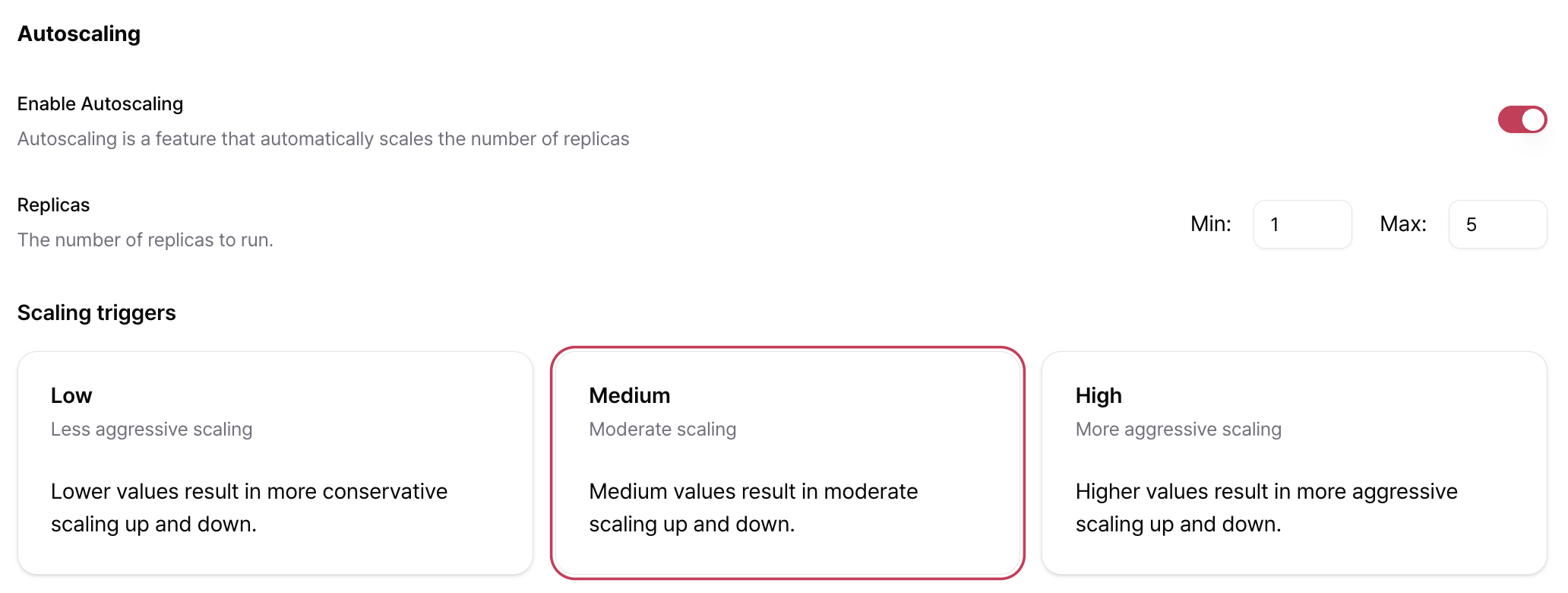
Autoscaling can be enabled during container deployment or later from the Settings page. Autoscaling Setting Eng05

Configuration

SettingDescription
Minimum ReplicasMinimum number of Replicas to keep running.
Maximum ReplicasMaximum number of Replicas that Autoscaling can provision.
Scaling SensitivityControls how aggressively Autoscaling responds to traffic changes (Low, Medium, or High).

Scaling Sensitivity

Scaling Sensitivity determines how quickly AirCloud responds to changes in traffic.
SensitivityBehaviorRecommended For
LowConservative scalingWorkloads with gradual traffic changes where excessive scale-outs should be avoided.
MediumBalanced scalingGeneral API services and model serving workloads. Recommended for most deployments.
HighAggressive scalingWorkloads with sudden traffic spikes and strict latency requirements.

Scheduled Scaling

Best Practices

  • Set Minimum Replicas to 1 if your service must always remain available. Setting it to 0 allows containers to scale down completely when there is no traffic.
  • Start with Medium scaling sensitivity and adjust it based on actual usage patterns.
  • Create multiple schedules to apply different scaling policies throughout the day.
  • Switching between fixed Replicas and Autoscaling restarts the container. Schedule these changes during periods of low traffic whenever possible.
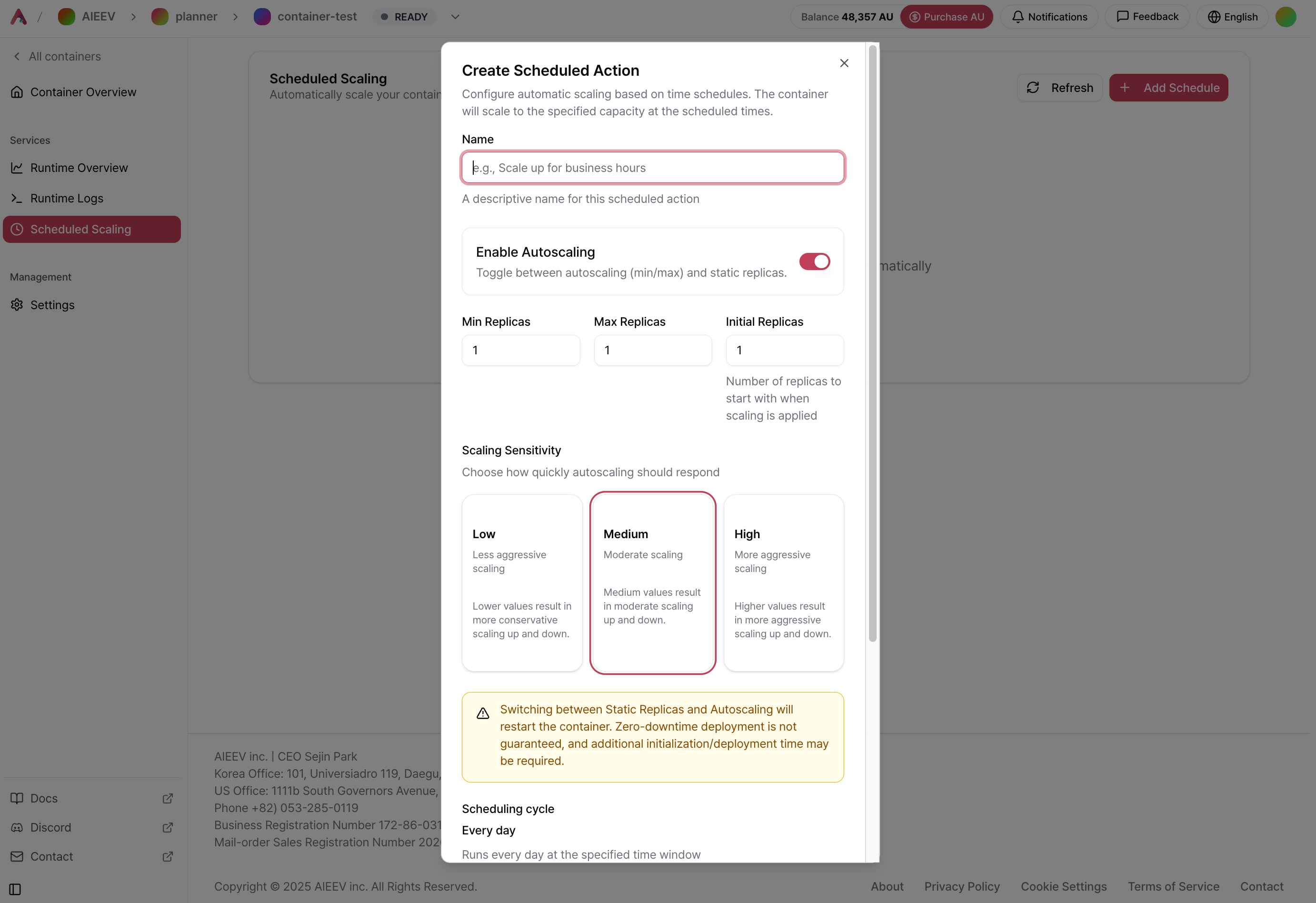
Scheduled Scaling automatically adjusts the number of Replicas according to a predefined schedule. It is particularly effective for workloads with predictable traffic patterns and can be used together with Autoscaling. Scheduling Eng592
Create a Schedule

From the container details page, navigate to Scheduled Scaling and click + Add Schedule. Each schedule can have its own independent scaling configuration.
SettingDescription
NameA descriptive name for the schedule (for example, Business Hours Scale Up).
Enable AutoscalingChoose whether to use Autoscaling (minimum and maximum Replicas) or a fixed number of Replicas during this schedule.
Minimum ReplicasMinimum number of Replicas to maintain while Autoscaling is enabled.
Maximum ReplicasMaximum number of Replicas that Autoscaling can provision.
Initial ReplicasNumber of Replicas to start when the schedule becomes active.
Scaling SensitivityAutoscaling responsiveness (Low, Medium, or High).
ScheduleCurrently supports daily recurring schedules.
Start TimeDate and time when the schedule starts. (Optional, KST)
End TimeTime when the schedule ends. (Optional)
EnabledEnables or disables the schedule.
Switching between fixed Replicas and Autoscaling restarts the container. Zero-downtime deployment is not guaranteed, and additional time may be required for initialization and deployment.

Example: Business Hours Traffic

Suppose your application experiences higher traffic between 9:00 AM and 7:00 PM (KST) every day.
  • Schedule 1Business Hours Scale Up: Autoscaling Enabled, Minimum Replicas 2, Maximum Replicas 5, Start Time 09:00 KST
  • Schedule 2Scale Down at Night: Autoscaling Disabled, Fixed Replicas 1, Start Time 19:00 KST

Deploy a Container

Learn how to deploy a container and configure its resources.

Monitoring

Learn how to monitor usage, logs, and deployment settings.