> ## Documentation Index
> Fetch the complete documentation index at: https://docs.aieev.com/llms.txt
> Use this file to discover all available pages before exploring further.
# Authentication
> Generate and securely manage API keys
All AirCloud APIs use secret key–based authentication. Once you generate a secret key and include it in the request headers, the same authentication method applies to both Air API and Air Container.
## Generate an API Key
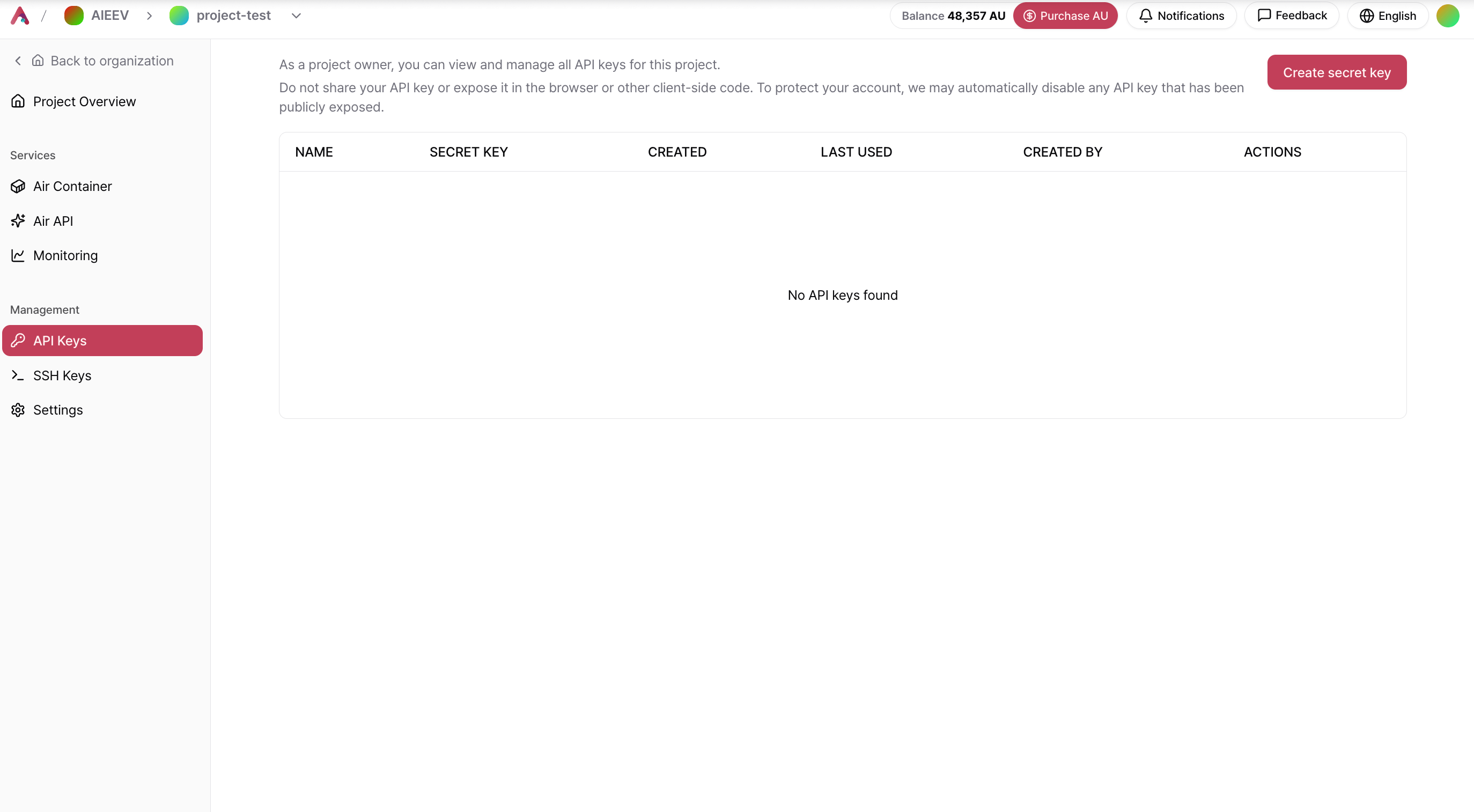
Navigate to the Project where you want to create an API key. In the Console, select **API Keys** from the left navigation menu, then click **Create New Secret Key**.
 Configure the following options in the key creation dialog.
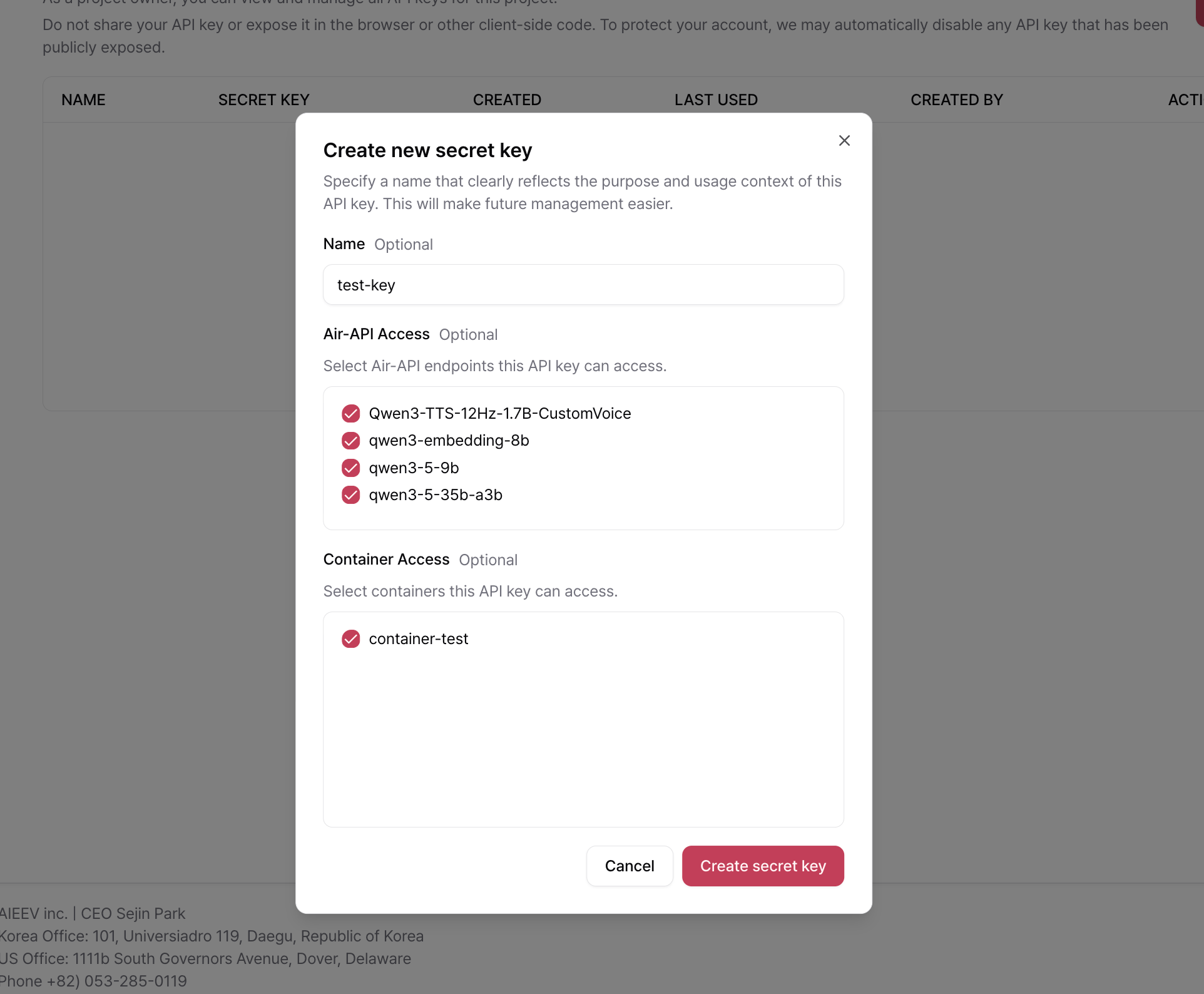 | Field | Description |
| -------------------- | ------------------------------------------------------------------------------------------ |
| **Name** | A descriptive name that identifies the purpose and usage of the key for easier management. |
| **Air API Access** | Specifies which Air API endpoints can be accessed using this key. |
| **Container Access** | Specifies which Air Container deployments can be accessed using this key. |
**A secret key is displayed only once when it is created.** Be sure to copy and store it in a secure location. If you lose the key, you must delete it and generate a new one.
## Authentication Header
Include your secret key in the `Authorization` header for every API request.
```text theme={null}
Authorization: Bearer YOUR_API_KEY
```
## Security Best Practices
Never hardcode your secret key in your source code. If it is committed to a repository, it may be exposed to others. We recommend storing it as an environment variable.
```bash .env theme={null}
AIRCLOUD_API_KEY=YOUR_API_KEY
```
```python Python theme={null}
import os
api_key = os.environ["AIRCLOUD_API_KEY"]
```
```javascript Node.js theme={null}
const apiKey = process.env.AIRCLOUD_API_KEY;
```
## If Your Key Is Lost or Compromised
Immediately delete the affected key from the **API Keys** page in the Console and generate a new one. A compromised key remains valid until it is revoked, so we strongly recommend deleting it as soon as possible.
## Related Documentation
Learn how to authenticate and call Air API using your secret key.
Learn how to resolve authentication errors and other common issues.
| Field | Description |
| -------------------- | ------------------------------------------------------------------------------------------ |
| **Name** | A descriptive name that identifies the purpose and usage of the key for easier management. |
| **Air API Access** | Specifies which Air API endpoints can be accessed using this key. |
| **Container Access** | Specifies which Air Container deployments can be accessed using this key. |
**A secret key is displayed only once when it is created.** Be sure to copy and store it in a secure location. If you lose the key, you must delete it and generate a new one.
## Authentication Header
Include your secret key in the `Authorization` header for every API request.
```text theme={null}
Authorization: Bearer YOUR_API_KEY
```
## Security Best Practices
Never hardcode your secret key in your source code. If it is committed to a repository, it may be exposed to others. We recommend storing it as an environment variable.
```bash .env theme={null}
AIRCLOUD_API_KEY=YOUR_API_KEY
```
```python Python theme={null}
import os
api_key = os.environ["AIRCLOUD_API_KEY"]
```
```javascript Node.js theme={null}
const apiKey = process.env.AIRCLOUD_API_KEY;
```
## If Your Key Is Lost or Compromised
Immediately delete the affected key from the **API Keys** page in the Console and generate a new one. A compromised key remains valid until it is revoked, so we strongly recommend deleting it as soon as possible.
## Related Documentation
Learn how to authenticate and call Air API using your secret key.
Learn how to resolve authentication errors and other common issues.