> ## Documentation Index
> Fetch the complete documentation index at: https://docs.aieev.com/llms.txt
> Use this file to discover all available pages before exploring further.
# Autoscaling and Scheduled Scaling
> Automatically scale replicas based on traffic or schedules
Air Container supports both **Autoscaling** and **Scheduled Scaling**, allowing you to automatically adjust the number of Replicas based on traffic patterns or predefined schedules.
## Autoscaling
Autoscaling automatically increases or decreases the number of Replicas based on incoming traffic. It is useful when:
* Traffic varies significantly throughout the day.
* You want to reduce response latency while improving resource efficiency.
* Manually adjusting the number of Replicas is impractical.
Autoscaling can be enabled during container deployment or later from the **Settings** page.
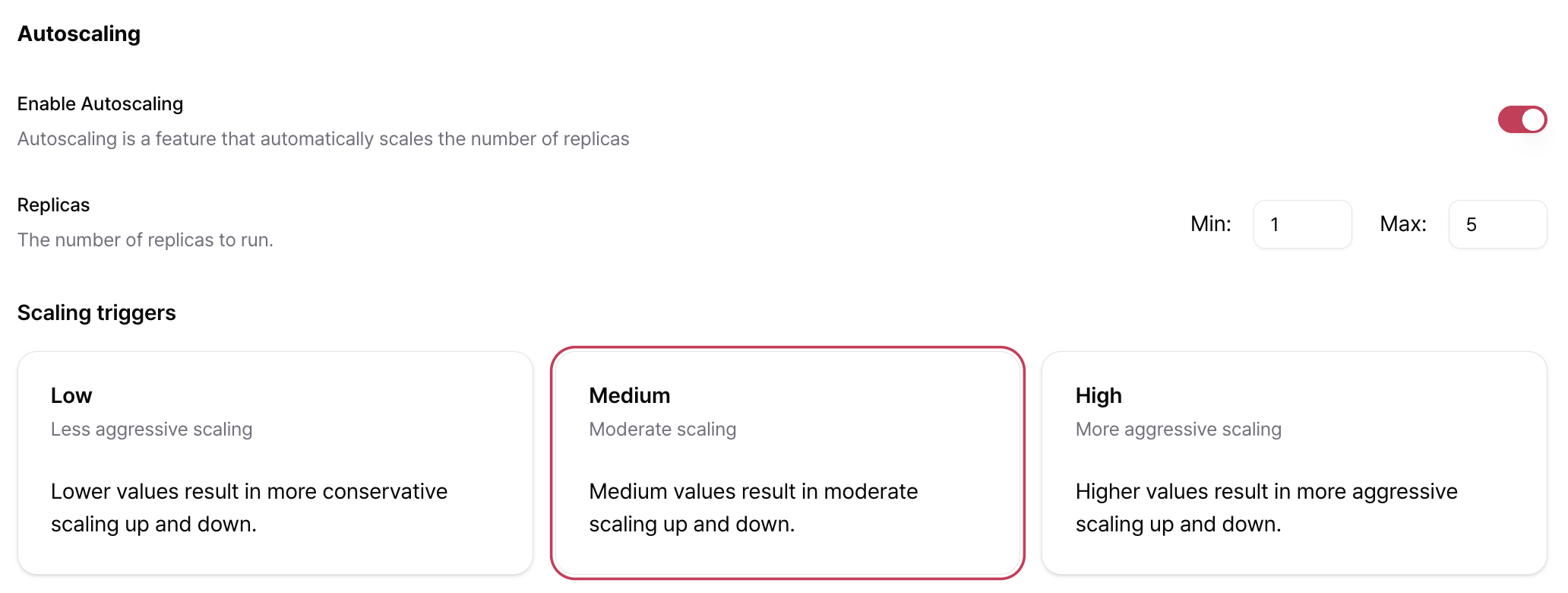 ### Configuration
| Setting | Description |
| ----------------------- | ----------------------------------------------------------------------------------------------------- |
| **Minimum Replicas** | Minimum number of Replicas to keep running. |
| **Maximum Replicas** | Maximum number of Replicas that Autoscaling can provision. |
| **Scaling Sensitivity** | Controls how aggressively Autoscaling responds to traffic changes (**Low**, **Medium**, or **High**). |
### Scaling Sensitivity
Scaling Sensitivity determines how quickly AirCloud responds to changes in traffic.
| Sensitivity | Behavior | Recommended For |
| ----------- | -------------------- | ------------------------------------------------------------------------------------ |
| **Low** | Conservative scaling | Workloads with gradual traffic changes where excessive scale-outs should be avoided. |
| **Medium** | Balanced scaling | General API services and model serving workloads. Recommended for most deployments. |
| **High** | Aggressive scaling | Workloads with sudden traffic spikes and strict latency requirements. |
## Scheduled Scaling
* Set **Minimum Replicas** to **1** if your service must always remain available. Setting it to **0** allows containers to scale down completely when there is no traffic.
* Start with **Medium** scaling sensitivity and adjust it based on actual usage patterns.
* Create multiple schedules to apply different scaling policies throughout the day.
* Switching between fixed Replicas and Autoscaling restarts the container. Schedule these changes during periods of low traffic whenever possible.
Scheduled Scaling automatically adjusts the number of Replicas according to a predefined schedule. It is particularly effective for workloads with predictable traffic patterns and can be used together with Autoscaling.
### Configuration
| Setting | Description |
| ----------------------- | ----------------------------------------------------------------------------------------------------- |
| **Minimum Replicas** | Minimum number of Replicas to keep running. |
| **Maximum Replicas** | Maximum number of Replicas that Autoscaling can provision. |
| **Scaling Sensitivity** | Controls how aggressively Autoscaling responds to traffic changes (**Low**, **Medium**, or **High**). |
### Scaling Sensitivity
Scaling Sensitivity determines how quickly AirCloud responds to changes in traffic.
| Sensitivity | Behavior | Recommended For |
| ----------- | -------------------- | ------------------------------------------------------------------------------------ |
| **Low** | Conservative scaling | Workloads with gradual traffic changes where excessive scale-outs should be avoided. |
| **Medium** | Balanced scaling | General API services and model serving workloads. Recommended for most deployments. |
| **High** | Aggressive scaling | Workloads with sudden traffic spikes and strict latency requirements. |
## Scheduled Scaling
* Set **Minimum Replicas** to **1** if your service must always remain available. Setting it to **0** allows containers to scale down completely when there is no traffic.
* Start with **Medium** scaling sensitivity and adjust it based on actual usage patterns.
* Create multiple schedules to apply different scaling policies throughout the day.
* Switching between fixed Replicas and Autoscaling restarts the container. Schedule these changes during periods of low traffic whenever possible.
Scheduled Scaling automatically adjusts the number of Replicas according to a predefined schedule. It is particularly effective for workloads with predictable traffic patterns and can be used together with Autoscaling.
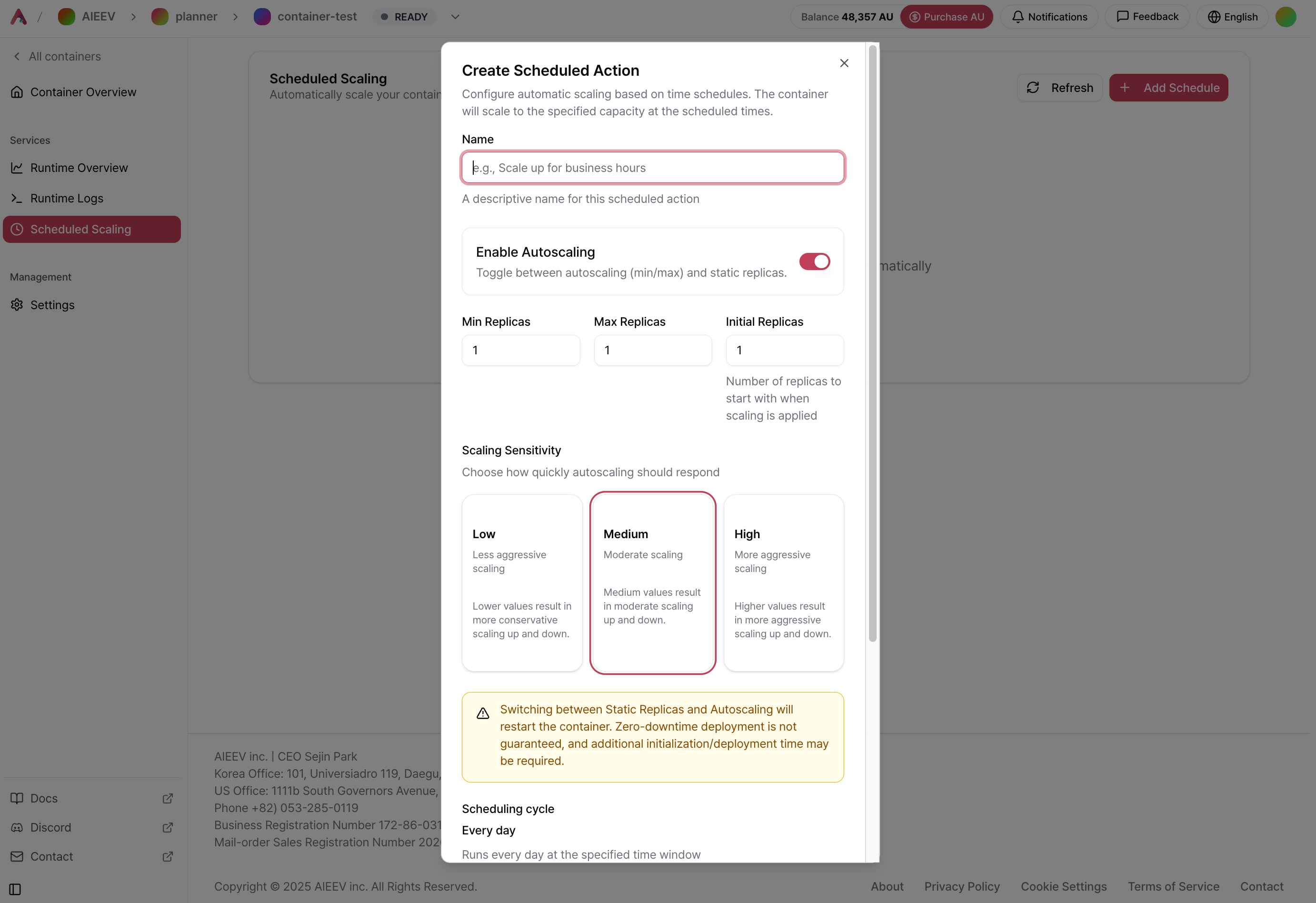 ### Create a Schedule
From the container details page, navigate to **Scheduled Scaling** and click **+ Add Schedule**.
Each schedule can have its own independent scaling configuration.
| Setting | Description |
| ----------------------- | -------------------------------------------------------------------------------------------------------------------- |
| **Name** | A descriptive name for the schedule (for example, **Business Hours Scale Up**). |
| **Enable Autoscaling** | Choose whether to use Autoscaling (minimum and maximum Replicas) or a fixed number of Replicas during this schedule. |
| **Minimum Replicas** | Minimum number of Replicas to maintain while Autoscaling is enabled. |
| **Maximum Replicas** | Maximum number of Replicas that Autoscaling can provision. |
| **Initial Replicas** | Number of Replicas to start when the schedule becomes active. |
| **Scaling Sensitivity** | Autoscaling responsiveness (**Low**, **Medium**, or **High**). |
| **Schedule** | Currently supports daily recurring schedules. |
| **Start Time** | Date and time when the schedule starts. (Optional, KST) |
| **End Time** | Time when the schedule ends. (Optional) |
| **Enabled** | Enables or disables the schedule. |
Switching between **fixed Replicas** and **Autoscaling** restarts the container. Zero-downtime deployment is not guaranteed, and additional time may be required for initialization and deployment.
### Example: Business Hours Traffic
Suppose your application experiences higher traffic between **9:00 AM and 7:00 PM (KST)** every day.
* **Schedule 1** — **Business Hours Scale Up**: Autoscaling **Enabled**, Minimum Replicas **2**, Maximum Replicas **5**, Start Time **09:00 KST**
* **Schedule 2** — **Scale Down at Night**: Autoscaling **Disabled**, Fixed Replicas **1**, Start Time **19:00 KST**
## Related Documentation
Learn how to deploy a container and configure its resources.
Learn how to monitor usage, logs, and deployment settings.
### Create a Schedule
From the container details page, navigate to **Scheduled Scaling** and click **+ Add Schedule**.
Each schedule can have its own independent scaling configuration.
| Setting | Description |
| ----------------------- | -------------------------------------------------------------------------------------------------------------------- |
| **Name** | A descriptive name for the schedule (for example, **Business Hours Scale Up**). |
| **Enable Autoscaling** | Choose whether to use Autoscaling (minimum and maximum Replicas) or a fixed number of Replicas during this schedule. |
| **Minimum Replicas** | Minimum number of Replicas to maintain while Autoscaling is enabled. |
| **Maximum Replicas** | Maximum number of Replicas that Autoscaling can provision. |
| **Initial Replicas** | Number of Replicas to start when the schedule becomes active. |
| **Scaling Sensitivity** | Autoscaling responsiveness (**Low**, **Medium**, or **High**). |
| **Schedule** | Currently supports daily recurring schedules. |
| **Start Time** | Date and time when the schedule starts. (Optional, KST) |
| **End Time** | Time when the schedule ends. (Optional) |
| **Enabled** | Enables or disables the schedule. |
Switching between **fixed Replicas** and **Autoscaling** restarts the container. Zero-downtime deployment is not guaranteed, and additional time may be required for initialization and deployment.
### Example: Business Hours Traffic
Suppose your application experiences higher traffic between **9:00 AM and 7:00 PM (KST)** every day.
* **Schedule 1** — **Business Hours Scale Up**: Autoscaling **Enabled**, Minimum Replicas **2**, Maximum Replicas **5**, Start Time **09:00 KST**
* **Schedule 2** — **Scale Down at Night**: Autoscaling **Disabled**, Fixed Replicas **1**, Start Time **19:00 KST**
## Related Documentation
Learn how to deploy a container and configure its resources.
Learn how to monitor usage, logs, and deployment settings.