> ## Documentation Index
> Fetch the complete documentation index at: https://docs.aieev.com/llms.txt
> Use this file to discover all available pages before exploring further.
# API Usage Guide
> Authenticate with a secret key and integrate Air API
This guide explains how to call Air API from your application after generating a secret key. Air API provides an OpenAI-compatible interface, allowing you to integrate with minimal code changes. If you are already using the OpenAI SDK, simply replace the `base_url` and API key.
## Migrate from OpenAI to AirCloud
If your application already uses the OpenAI SDK, you only need to update two settings.
```python Python theme={null}
# Before — OpenAI
from openai import OpenAI
client = OpenAI(api_key="sk-...")
# After — AirCloud
from openai import OpenAI
client = OpenAI(
api_key="YOUR_AIRCLOUD_API_KEY", # Replace with your AirCloud secret key
base_url="YOUR_ENDPOINT" # Replace with your AirCloud endpoint
)
```
```javascript Node.js theme={null}
// Before — OpenAI
import OpenAI from "openai";
const client = new OpenAI({ apiKey: "sk-..." });
// After — AirCloud
import OpenAI from "openai";
const client = new OpenAI({
apiKey: "YOUR_AIRCLOUD_API_KEY", // Replace with your AirCloud secret key
baseURL: "YOUR_ENDPOINT", // Replace with your AirCloud endpoint
});
```
### Migration Checklist
* Replace `base_url` / `baseURL` with your AirCloud endpoint from the Console.
* Replace your OpenAI API key with an AirCloud secret key.
* Update the `model` parameter to an AirCloud model ID.
## Find Your Endpoint and Secret Key
Select your API workload in the Console, then click **View Code** to view the endpoint URL and code samples for the selected model.
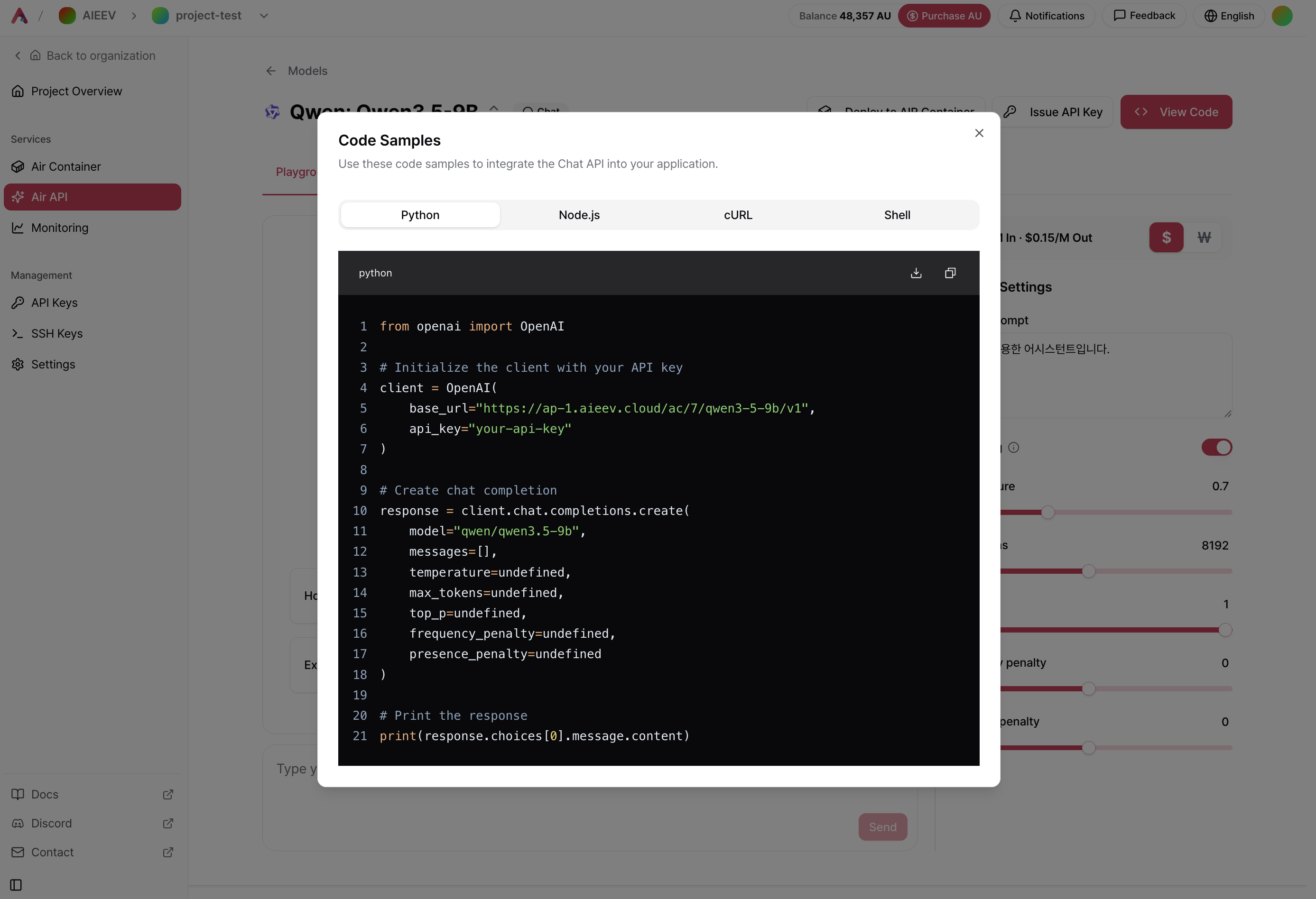 Replace `YOUR_ENDPOINT` and `YOUR_API_KEY` in the sample code with the values from your Console.
## Authentication
Include your secret key in the `Authorization` header for every API request.
```text theme={null}
Authorization: Bearer YOUR_API_KEY
```
A secret key is displayed only once when it is created. We recommend storing it as an environment variable instead of hardcoding it in your source code. If you lose the key, generate a new one from the Console.
## Code Examples
### Chat Models
```python Python theme={null}
from openai import OpenAI
client = OpenAI(
api_key="YOUR_API_KEY",
base_url="YOUR_ENDPOINT"
)
response = client.chat.completions.create(
model="YOUR_MODEL_ID",
messages=[
{"role": "user", "content": "Hello"}
]
)
print(response.choices[0].message.content)
```
```javascript Node.js theme={null}
import OpenAI from "openai";
const client = new OpenAI({
apiKey: "YOUR_API_KEY",
baseURL: "YOUR_ENDPOINT",
});
const response = await client.chat.completions.create({
model: "YOUR_MODEL_ID",
messages: [{ role: "user", content: "Hello" }],
});
console.log(response.choices[0].message.content);
```
```bash cURL theme={null}
curl YOUR_ENDPOINT/chat/completions \
-H "Authorization: Bearer YOUR_API_KEY" \
-H "Content-Type: application/json" \
-d '{
"model": "YOUR_MODEL_ID",
"messages": [
{"role": "user", "content": "Hello"}
]
}'
```
```bash Shell theme={null}
#!/bin/bash
API_KEY="YOUR_API_KEY"
response=$(curl -s -X POST YOUR_ENDPOINT/chat/completions \
-H "Authorization: Bearer $API_KEY" \
-H "Content-Type: application/json" \
-d '{
"model": "YOUR_MODEL_ID",
"messages": [{"role": "user", "content": "Hello"}]
}')
echo "$response" | jq .
```
### TTS Models
```python Python theme={null}
from openai import OpenAI
client = OpenAI(
api_key="YOUR_API_KEY",
base_url="YOUR_ENDPOINT"
)
response = client.audio.speech.create(
model="YOUR_MODEL_ID",
input="Hello. It's a beautiful day today.",
voice="aiden"
)
response.stream_to_file("output.mp3")
```
```javascript Node.js theme={null}
import OpenAI from "openai";
import fs from "fs";
const client = new OpenAI({
apiKey: "YOUR_API_KEY",
baseURL: "YOUR_ENDPOINT",
});
const response = await client.audio.speech.create({
model: "YOUR_MODEL_ID",
input: "Hello. It's a beautiful day today.",
voice: "aiden",
});
const buffer = Buffer.from(await response.arrayBuffer());
fs.writeFileSync("output.mp3", buffer);
```
```bash cURL theme={null}
curl YOUR_ENDPOINT/audio/speech \
-H "Authorization: Bearer YOUR_API_KEY" \
-H "Content-Type: application/json" \
-d '{
"model": "YOUR_MODEL_ID",
"input": "Hello. It'\''s a beautiful day today.",
"voice": "aiden"
}' \
--output output.mp3
```
```bash Shell theme={null}
#!/bin/bash
API_KEY="YOUR_API_KEY"
curl -s -X POST YOUR_ENDPOINT/audio/speech \
-H "Authorization: Bearer $API_KEY" \
-H "Content-Type: application/json" \
-d '{
"model": "YOUR_MODEL_ID",
"input": "Hello. It'\''s a beautiful day today.",
"voice": "aiden"
}' \
--output output.mp3
```
### Embedding Models
```python Python theme={null}
from openai import OpenAI
client = OpenAI(
api_key="YOUR_API_KEY",
base_url="YOUR_ENDPOINT"
)
response = client.embeddings.create(
model="YOUR_MODEL_ID",
input="Convert this text into an embedding."
)
print(response.data[0].embedding)
```
```javascript Node.js theme={null}
import OpenAI from "openai";
const client = new OpenAI({
apiKey: "YOUR_API_KEY",
baseURL: "YOUR_ENDPOINT",
});
const response = await client.embeddings.create({
model: "YOUR_MODEL_ID",
input: "Convert this text into an embedding.",
});
console.log(response.data[0].embedding);
```
```bash cURL theme={null}
curl -X POST YOUR_ENDPOINT/embeddings \
-H "Authorization: Bearer YOUR_API_KEY" \
-H "Content-Type: application/json" \
-d '{
"model": "YOUR_MODEL_ID",
"input": "Convert this text into an embedding."
}'
```
```bash Shell theme={null}
#!/bin/bash
API_KEY="YOUR_API_KEY"
response=$(curl -s -X POST YOUR_ENDPOINT/embeddings \
-H "Authorization: Bearer $API_KEY" \
-H "Content-Type: application/json" \
-d '{
"model": "YOUR_MODEL_ID",
"input": "Convert this text into an embedding."
}')
echo "$response" | jq .
```
## Best Practices
* **Protect your API key** — Store your secret key as an environment variable and never commit it to a source repository.
* **Monitor usage** — Regularly review API usage and costs in the **Usage** tab of the Console.
* **Maintain available credits** — API requests stop when your credits are exhausted. We recommend enabling automatic top-up to avoid service interruptions.
## Related Documentation
Learn how to select models and test them using the Playground.
Find solutions to common issues and errors.
Explore detailed API specifications, including endpoints and parameters.
Replace `YOUR_ENDPOINT` and `YOUR_API_KEY` in the sample code with the values from your Console.
## Authentication
Include your secret key in the `Authorization` header for every API request.
```text theme={null}
Authorization: Bearer YOUR_API_KEY
```
A secret key is displayed only once when it is created. We recommend storing it as an environment variable instead of hardcoding it in your source code. If you lose the key, generate a new one from the Console.
## Code Examples
### Chat Models
```python Python theme={null}
from openai import OpenAI
client = OpenAI(
api_key="YOUR_API_KEY",
base_url="YOUR_ENDPOINT"
)
response = client.chat.completions.create(
model="YOUR_MODEL_ID",
messages=[
{"role": "user", "content": "Hello"}
]
)
print(response.choices[0].message.content)
```
```javascript Node.js theme={null}
import OpenAI from "openai";
const client = new OpenAI({
apiKey: "YOUR_API_KEY",
baseURL: "YOUR_ENDPOINT",
});
const response = await client.chat.completions.create({
model: "YOUR_MODEL_ID",
messages: [{ role: "user", content: "Hello" }],
});
console.log(response.choices[0].message.content);
```
```bash cURL theme={null}
curl YOUR_ENDPOINT/chat/completions \
-H "Authorization: Bearer YOUR_API_KEY" \
-H "Content-Type: application/json" \
-d '{
"model": "YOUR_MODEL_ID",
"messages": [
{"role": "user", "content": "Hello"}
]
}'
```
```bash Shell theme={null}
#!/bin/bash
API_KEY="YOUR_API_KEY"
response=$(curl -s -X POST YOUR_ENDPOINT/chat/completions \
-H "Authorization: Bearer $API_KEY" \
-H "Content-Type: application/json" \
-d '{
"model": "YOUR_MODEL_ID",
"messages": [{"role": "user", "content": "Hello"}]
}')
echo "$response" | jq .
```
### TTS Models
```python Python theme={null}
from openai import OpenAI
client = OpenAI(
api_key="YOUR_API_KEY",
base_url="YOUR_ENDPOINT"
)
response = client.audio.speech.create(
model="YOUR_MODEL_ID",
input="Hello. It's a beautiful day today.",
voice="aiden"
)
response.stream_to_file("output.mp3")
```
```javascript Node.js theme={null}
import OpenAI from "openai";
import fs from "fs";
const client = new OpenAI({
apiKey: "YOUR_API_KEY",
baseURL: "YOUR_ENDPOINT",
});
const response = await client.audio.speech.create({
model: "YOUR_MODEL_ID",
input: "Hello. It's a beautiful day today.",
voice: "aiden",
});
const buffer = Buffer.from(await response.arrayBuffer());
fs.writeFileSync("output.mp3", buffer);
```
```bash cURL theme={null}
curl YOUR_ENDPOINT/audio/speech \
-H "Authorization: Bearer YOUR_API_KEY" \
-H "Content-Type: application/json" \
-d '{
"model": "YOUR_MODEL_ID",
"input": "Hello. It'\''s a beautiful day today.",
"voice": "aiden"
}' \
--output output.mp3
```
```bash Shell theme={null}
#!/bin/bash
API_KEY="YOUR_API_KEY"
curl -s -X POST YOUR_ENDPOINT/audio/speech \
-H "Authorization: Bearer $API_KEY" \
-H "Content-Type: application/json" \
-d '{
"model": "YOUR_MODEL_ID",
"input": "Hello. It'\''s a beautiful day today.",
"voice": "aiden"
}' \
--output output.mp3
```
### Embedding Models
```python Python theme={null}
from openai import OpenAI
client = OpenAI(
api_key="YOUR_API_KEY",
base_url="YOUR_ENDPOINT"
)
response = client.embeddings.create(
model="YOUR_MODEL_ID",
input="Convert this text into an embedding."
)
print(response.data[0].embedding)
```
```javascript Node.js theme={null}
import OpenAI from "openai";
const client = new OpenAI({
apiKey: "YOUR_API_KEY",
baseURL: "YOUR_ENDPOINT",
});
const response = await client.embeddings.create({
model: "YOUR_MODEL_ID",
input: "Convert this text into an embedding.",
});
console.log(response.data[0].embedding);
```
```bash cURL theme={null}
curl -X POST YOUR_ENDPOINT/embeddings \
-H "Authorization: Bearer YOUR_API_KEY" \
-H "Content-Type: application/json" \
-d '{
"model": "YOUR_MODEL_ID",
"input": "Convert this text into an embedding."
}'
```
```bash Shell theme={null}
#!/bin/bash
API_KEY="YOUR_API_KEY"
response=$(curl -s -X POST YOUR_ENDPOINT/embeddings \
-H "Authorization: Bearer $API_KEY" \
-H "Content-Type: application/json" \
-d '{
"model": "YOUR_MODEL_ID",
"input": "Convert this text into an embedding."
}')
echo "$response" | jq .
```
## Best Practices
* **Protect your API key** — Store your secret key as an environment variable and never commit it to a source repository.
* **Monitor usage** — Regularly review API usage and costs in the **Usage** tab of the Console.
* **Maintain available credits** — API requests stop when your credits are exhausted. We recommend enabling automatic top-up to avoid service interruptions.
## Related Documentation
Learn how to select models and test them using the Playground.
Find solutions to common issues and errors.
Explore detailed API specifications, including endpoints and parameters.